
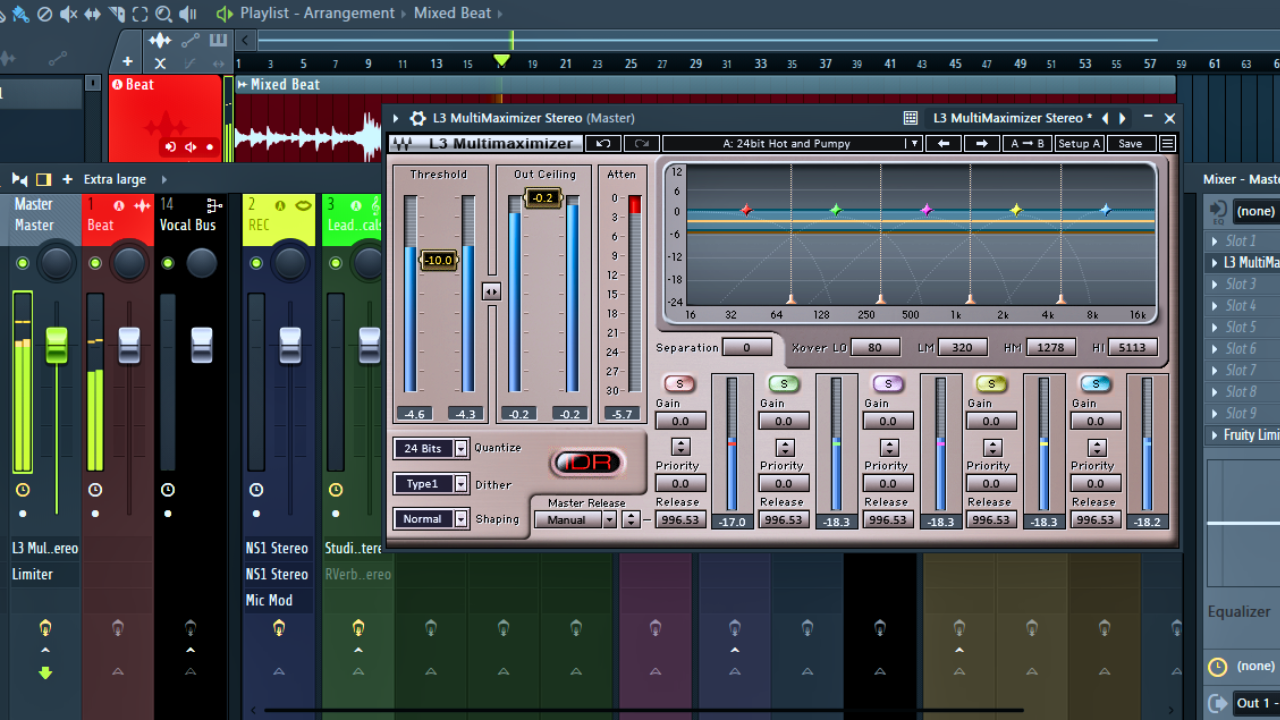
Crash Course on Audio Maximizers: Get the Most Volume Without Destroying Your Mix
By Jatari
What a Maximizer Really Is
A maximizer is fundamentally about getting the most volume out of your recordings. That is its core purpose. At first glance, a maximizer can look like a limiter or a compressor, and in many ways it behaves like both. However, it does a little bit more, and that extra functionality is what makes it such a powerful—and potentially dangerous—tool in audio production.
To understand what a maximizer does, it helps to first understand how a normalizer works.
Normalizers vs. Maximizers
A normalizer operates in a very straightforward way. It scans your entire program and identifies the highest peak in the signal. Once it finds that peak, it boosts the entire signal so that this peak reaches a defined ceiling level.
For example:
- If the loudest peak in your track is 5 dB below the target ceiling
- The normalizer will boost the entire signal by 5 dB
This means everything gets louder by the same amount, regardless of whether most of the material actually needed that gain.
The problem is that these loudest peaks usually:
- Last only a millisecond
- Represent a tiny fraction of the entire song
- Do not reflect the perceived loudness of the mix as a whole
As a result, traditional normalization often leaves a lot of potential loudness unused.
This is where the maximizer comes in.
A Maximizer Is Two Tools in One
Most maximizers appear deceptively simple. In many cases, they only offer two main controls:
- Threshold
- Output level (or output ceiling)
Despite this simplicity, what is happening under the hood is more advanced.
A maximizer can be described very simply as
A normalizer with a limiter placed in front of it.
Here is how that works in practice:
- The maximizer still normalizes the signal toward a ceiling
- But when you lower the threshold, it actively looks for peaks that rise above that threshold
- Those peaks are then limited, rather than allowed to dictate the gain of the entire signal
Because those short, sharp peaks are controlled, the rest of the signal can be pushed louder without clipping. This is why a maximizer allows you to achieve higher perceived loudness than a normalizer alone ever could.
Why Maximizers Are Primarily Mastering Tools
Most maximizers include additional features that go beyond simple level control, such as
- Quantization
- Dithering
- Noise shaping
The presence of these options is a strong indication of their intended use. Maximizers are designed primarily for mastering, not casual track-level processing.
If you are using a maximizer as an insert on an individual track, it is generally best practice to:
- Turn off dithering
- Turn off quantization
- Reserve those processes for the final stage of conversion
This becomes especially important when converting a mix, for example:
- From 24-bit to 16-bit
That final conversion stage is where dithering and noise shaping truly belong.
What a Maximizer Does to a Mix
When applied to a full mix, a maximizer can have a dramatic impact. Adjusting the threshold alone can radically change how loud, dense, and aggressive a track feels.
Lowering the threshold:
- Increases overall loudness
- Reduces transient peaks
- Pushes the mix closer to a constant level
This effect can be powerful—and immediately noticeable. Even small adjustments can significantly alter the character of the final mix.
However, this power comes with consequences.
The Hidden Cost: Squashing Your Mix
When the threshold is pushed too far, the maximizer begins to squash the mix. Transients lose their impact. Musical contrast starts to disappear. Everything becomes loud, but nothing feels dynamic anymore.
This is where many mixes go wrong.
It is very easy to fall into the trap of over-maximization, especially when chasing loudness. The result is often a mix that is technically loud but emotionally flat.
Why Dynamic Range Still Matters
One of the most important principles to keep in mind when working with maximizers is this:
Our ears like dynamic range.
Dynamic range gives music meaning. It provides a reference point between:
- Soft
- Loud
Without that contrast, loudness loses its impact. Ironically, a song with preserved dynamics can feel both softer and louder at the same time, simply because the listener has something to compare against.
Dynamic range allows:
- Quiet moments to breathe
- Loud moments to hit harder
- The listener stays engaged over time
The Problem With Over-Maximized Tracks
There are countless tracks that have been pushed too far with maximizers. Many of them could have sounded significantly better if they had been:
- Recorded properly
- Mixed with intention
- Left with a bit of headroom
- Allowed to retain their natural dynamics
When everything is maximized to the extreme, the music loses its sense of movement. It becomes a wall of sound with no depth, no contrast, and no emotional arc.
That is not what music is about.
Using Maximizers the Right Way
Maximizers are not inherently bad tools. On the contrary, they are essential in modern production when used correctly. The key is intentional use, not automatic application.
When working with maximizers, always keep the following in mind:
- Loudness is not everything
- Short peaks do not define musical impact
- Dynamic range enhances perceived loudness
- A little headroom can go a long way
Use maximizers to enhance your mix—not to suffocate it.
Final Perspective
A maximizer is a powerful finishing tool. It can elevate a well-balanced mix or completely undermine it if misused. Understanding what it does, why it exists, and where it belongs in the signal chain is essential for achieving professional results.
Used thoughtfully, a maximizer helps you get the most volume out of your recordings while still respecting the music itself.